
Claude CLI (Claude Code)
This guide walks you through routing Claude Code (the claude CLI) traffic through an Axemere gateway using a project settings file. Once routed, the gateway opens up several options depending on how your org is configured:
- OAuth passthrough: your Claude subscription token is forwarded directly, so usage counts against your subscription rather than an API key. This is what the setup steps below document.
- Company API key: your org's Anthropic API key lives on the gateway; developers send their subscription token to the gateway but billing is routed through the org's API key. Configured by the gateway admin; the developer setup steps are the same.
In all cases you can attribute calls to a workload, project, account, or customer for spend tracking and policy enforcement.
Prerequisites
-
Claude CLI installed: see Anthropic's install guide
-
A Claude subscription (paid plan: subscription OAuth tokens require an active subscription)
-
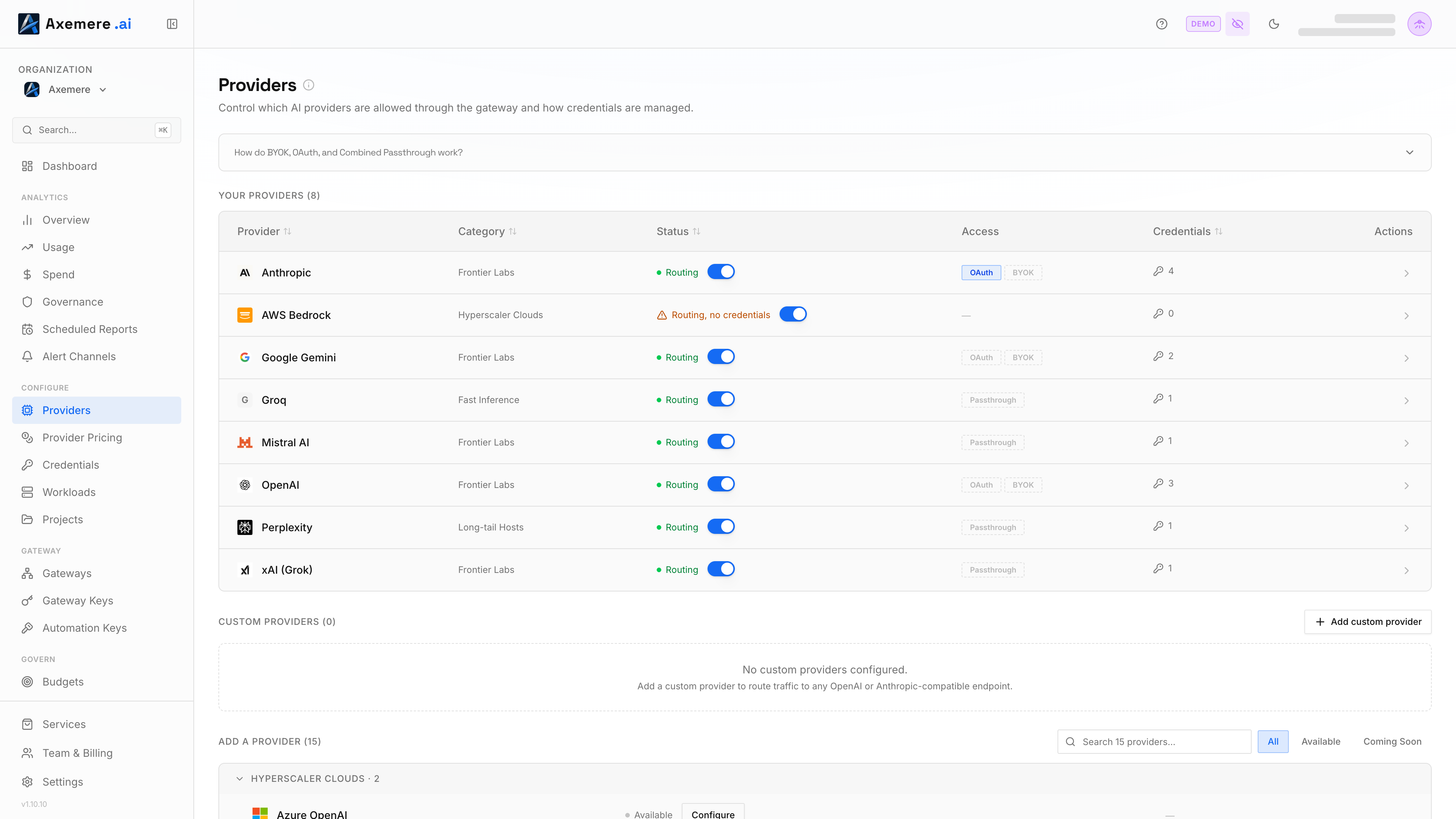
A running Axemere gateway with OAuth enabled for the Anthropic provider. Go to Customer Console → Providers:
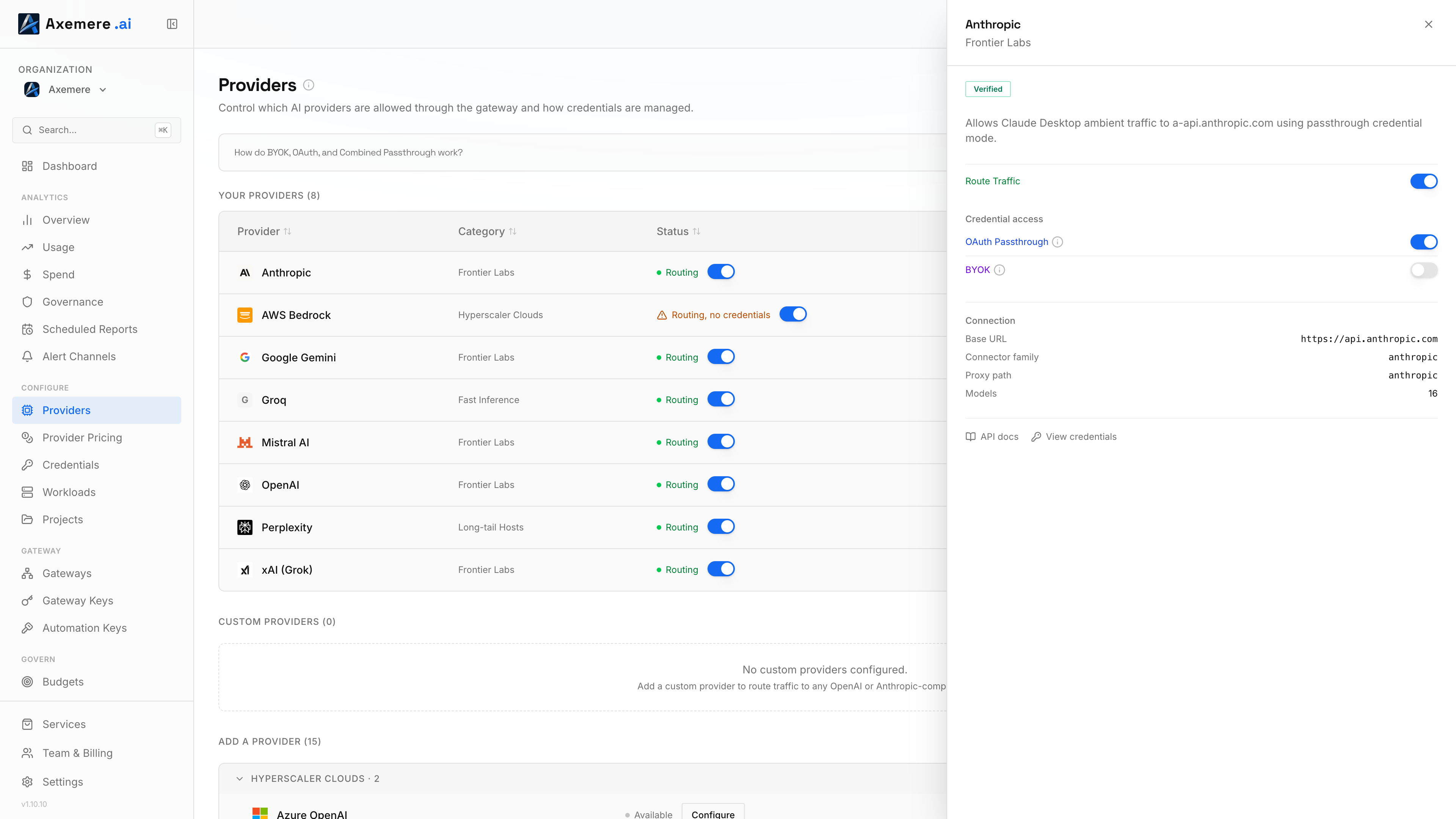
Open the Anthropic provider and confirm the OAuth toggle is on:
How It Works
The Claude CLI, when logged in via claude login and without ANTHROPIC_API_KEY set, sends its subscription OAuth token to whatever ANTHROPIC_BASE_URL points to. The Axemere gateway:
- Receives the request with the subscription token
- Applies org policy (rate limits, budgets, allow/deny rules, attribution)
- Forwards the request with the original token to
api.anthropic.com - Writes an audit record with token counts and estimated cost
Privacy: Axemere never stores, logs, or accesses the content of AI prompts or responses. Only request metadata (model, token counts, latency, attribution) is recorded. See Execution Records for exactly what is and isn't kept.
This guide covers Anthropic / Claude CLI specifically. Other providers supported by the gateway offer equivalent credential modes: company-managed keys, OAuth passthrough, and BYOK, configured per provider. See Credential Modes for the full picture, or go directly to Customer Console → Providers to configure credential modes for your org.
Setup
1. Log in to Claude CLI
claude login
Follow the browser prompt to authenticate with your Anthropic account. This stores a subscription OAuth token locally.
2. Create the settings file
In the directory where you run claude, create a .claude/ directory and add a settings.local.json file:
mkdir -p .claude
Managed gateway
{
  "env": {
    "ANTHROPIC_BASE_URL": "https://us.gw.axemere.ai/proxy/anthropic/k/gwk_your-key-here/w/YOUR_WORKLOAD_ID"
  }
}
Go to Customer Console → Gateway Keys and open the Connection Info section for your key to get the exact URL. The /k/... segment is your Axemere gateway key; it is only shown at creation time and cannot be retrieved afterwards.
Tip — Workload and project attribution: You can embed a workload and project directly in the URL to tag every request for attribution in the Records page:
https://us.gw.axemere.ai/proxy/anthropic/k/gwk_your-key-here/w/my-team/p/my-project
w/ sets the workload and p/ sets the project. See the
Developer Integration Guide for the full URL
schema and attribution options.
Self-hosted gateway
{
  "env": {
    "ANTHROPIC_BASE_URL": "http://localhost:7080/proxy/anthropic/w/YOUR_WORKLOAD_ID"
  }
}
Replace the host with your gateway's address. See Proxy Path Attribution for the full URL syntax including project, account, and customer segments.
Use settings.local.json, not settings.json. The .local.json variant is gitignored by Claude CLI and will not be committed to your repository. Keep API keys and gateway URLs out of version control.
3. Verify
Run /status inside Claude CLI. The Anthropic base URL line should show your gateway URL:
/status output:
  Anthropic base URL:  https://us.gw.axemere.ai/proxy/anthropic/k/gwk_.../w/YOUR_WORKLOAD_ID
If the Anthropic base URL line is missing entirely, or shows https://api.anthropic.com, the settings file was not picked up: check the file path and JSON syntax.
Important: Do Not Set ANTHROPIC_API_KEY
This is a Claude CLI behavior, not an Axemere restriction: when ANTHROPIC_API_KEY is set in your environment, the CLI uses that key instead of the subscription OAuth token, regardless of what ANTHROPIC_BASE_URL is set to. The gateway then receives an API key rather than an OAuth token, which:
- Is subject to API key billing (not subscription billing)
- May be selected as a BYOK passthrough if that addon is enabled, or rejected if it is not
- Will not match the OAuth passthrough rules
To check:
echo $ANTHROPIC_API_KEY
If this prints a key, unset it before using Claude with the gateway:
unset ANTHROPIC_API_KEY
Settings File Scope
Claude CLI loads settings from four locations. Higher precedence overrides lower:
| File | Scope | Committed to repo? | Precedence |
|---|---|---|---|
.claude/settings.local.json | This project, this machine only | No (gitignored) | 1 — highest |
.claude/settings.json | This project, all users | Yes | 2 |
~/.claude/settings.local.json | All projects, this machine only | No (lives in home) | 3 |
~/.claude/settings.json | All projects, all machines | No (lives in home) | 4 — lowest |
A useful pattern: set the gateway URL globally in ~/.claude/settings.json so every claude session on your machine routes through the gateway; this means all Claude CLI activity is captured, and any session without a project-level override will be attributed to the org's default workload and project as configured in the console.
For projects where you want finer attribution, add a .claude/settings.local.json with a more specific workload or project segment. Project-level files take precedence over global ones.
Keep in mind that each settings file holds a single ANTHROPIC_BASE_URL, which means a single workload and attribution context. If you want different projects or sessions attributed differently, use per-project .claude/settings.local.json files with distinct URLs. See Proxy Path Attribution for the full URL syntax including project, account, and customer segments.
MCP Tool Search
Claude CLI disables MCP tool search by default when ANTHROPIC_BASE_URL points to a
non-first-party host, to prevent tool-discovery requests from being silently rerouted
through an untrusted proxy. If your organization requires MCP tool search, contact your
administrator to confirm it is supported with your gateway configuration before enabling it.
Cost and Attribution
Requests routed through the gateway are recorded in the Axemere audit log with:
- Cost: estimated at market API rates using provider pricing data. These estimated costs count toward project budgets and alert thresholds the same way API key spend does. Your actual charges with Anthropic depend on your subscription or usage agreement with them directly.
- Workload: the workload ID in your proxy URL (
/w/{workload_id}). Optional: if omitted, the gateway falls back to the org's default workload. Specify it when you have multiple workloads and want to attribute traffic to a specific one. Manage workloads in Customer Console → Workloads. - Optional attribution segments: add project, account, and customer dimensions to the URL for finer-grained tracking; see Proxy Path Attribution
Switching Between Gateway and Direct Anthropic Access
To temporarily bypass the gateway and use Anthropic directly, for example to isolate
whether an issue is gateway-related, remove ANTHROPIC_BASE_URL from your Claude Code
settings file and restart the session.
You can keep a parked copy by renaming the block:
{
  "_env_axemere": {
    "ANTHROPIC_BASE_URL": "https://us.gw.axemere.ai/proxy/anthropic/k/gwk_your-key-here"
  }
}
Claude CLI ignores keys it doesn't recognize, so renaming env to _env_axemere
disables the override without losing the values. Rename it back to env to re-enable.
If you used a per-project file (.claude/settings.local.json), you can also just delete
the file; Claude CLI will fall back to ~/.claude/settings.json (or direct Anthropic
access if that's also unset).
Troubleshooting
/status shows api.anthropic.com instead of the gateway URL
The settings file was not loaded. Check:
- The file is at
.claude/settings.local.jsonrelative to where you launchedclaude - The JSON is valid. It should look like:
{ "env": { "ANTHROPIC_BASE_URL": "https://us.gw.axemere.ai/proxy/anthropic/k/gwk_your-key-here/w/your-workload" } } - The
envkey is at the top level of the JSON object, not nested inside another key
claude: error: 401 Unauthorized
The gateway is rejecting the request. Check:
ANTHROPIC_API_KEYis not set in your environment (echo $ANTHROPIC_API_KEYshould print nothing)- The OAuth toggle is on for the Anthropic provider: verify in Customer Console → Providers
- If
/w/{workload_id}is present in your URL, the workload exists and is active: verify in Customer Console → Workloads. Omitting/w/entirely is valid and falls back to the default workload; a present but empty value (e.g./w//) returns 400.
Request reaches the gateway but is denied (403)
The org policy is blocking the request. Contact your administrator to check the policy bundle and confirm the OAuth toggle is enabled for the Anthropic provider in Customer Console → Providers.
Requests show API-key billing instead of subscription billing
ANTHROPIC_API_KEY is set. The CLI is sending an API key instead of the OAuth subscription token. Unset ANTHROPIC_API_KEY and retry.
Next Steps
| Task | Where to look |
|---|---|
| Create and manage gateway keys | Gateway Keys — Console |
| View request records and attribution | Records — Console |
| Configure policies that apply to gateway traffic | Configuration Guide |
| Understand workloads and attribution | Developer Integration Guide |
| Use the managed gateway for your team | Managed Gateway Guide |
| Understand all terms and fields | Glossary |