
Records
For: Platform operators and security teams inspecting individual AI request executions.
Operations Overview | Records | Usage | Analytics Overview | Approval Workflows | Quarantine
The Records page provides a paginated, filterable log of every AI request that passed through your Axemere gateway. Each record contains execution metadata: the policy decision, provider and model, attribution, token counts, and cost.
Privacy guarantee: Axemere does not store, log, or access AI request prompts or responses under any circumstances. Records contain only the metadata listed above, never the content of any AI conversation.
Records with the Ledger package also support on-demand cryptographic proof verification.
Navigation: console.axemere.ai/records
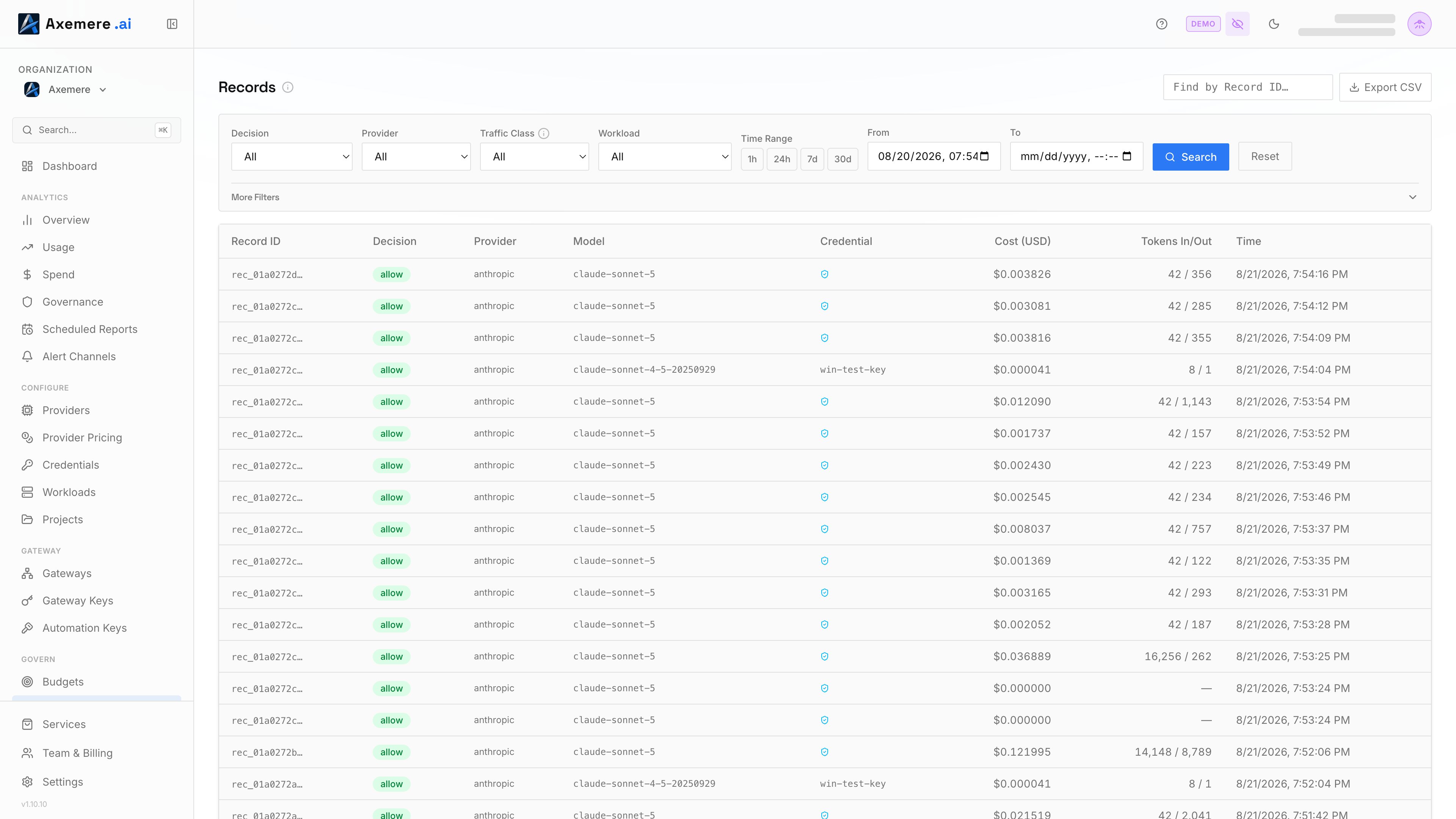
Table of Contents
Filters
The filter bar has two tiers.
Primary filters (always visible):
| Filter | Description |
|---|---|
| Decision | allow, deny, rate_limit, quarantine, or require_approval |
| Traffic Class | Developer (explicit API/SDK calls) or Ambient (system proxy / background traffic) |
| From / To | Date/time range |
Advanced filters (expandable; requires Core Platform):
| Group | Filter | Description |
|---|---|---|
| Record | Record ID | Exact UUID lookup |
| Request | Provider | Provider name (e.g. openai, anthropic) |
| Request | Model | Model name substring match |
| Request | Action Type | ai.infer or http.request |
| Request | Record Tier | Verified (content inspected) or Observed (TLS passthrough) |
| Request | Connection Type | Direct API, SDK Redirect, or System Proxy |
| Request | Target Host | Provider hostname (e.g. api.anthropic.com) |
| Request | Stream Outcome | Complete, Disconnected, Provider Error, Empty, or Canceled |
| Request | Gateway | Any gateway, no gateway, or a specific gateway ID |
| Identity | Credential | Provider credential ID |
| Identity | API Key | Axemere gateway key (dropdown of your org's keys) |
| Identity | Workload | Workload (dropdown) |
| Attribution | Project | Project (dropdown) |
| Attribution | Account / Customer / Labels | Attribution metadata tags |
Filters persist across page navigation within the session. The Dashboard "Blocked Requests" card links directly to Records pre-filtered to decision=deny for the current billing period.
Reading a Record
Each record is a row in the table. Click a row to expand it and see the full detail panel:
| Field | Description |
|---|---|
| Decision | allow, deny, rate_limit, quarantine, or require_approval, shown as a badge with the policy reason below it |
| Provider | The AI provider (e.g. openai, anthropic) |
| Model | The model name (e.g. gpt-4o) |
| Action Type | The action type (e.g. ai.infer) |
| Gateway | The gateway that processed the request |
| Credential | The provider credential used, with mode indicator |
| Cred Mode | How the credential was resolved: inline, alias, byok, oauth, or byok_header |
| API Key | The Axemere API key the caller authenticated with |
| Workload | The workload ID |
| Policy Bundle ID | The policy bundle that produced the decision (shown when set) |
| Attribution | Project, Account, Customer, Billing Owner (shown when set) |
| Tokens In / Out | Input and output token counts |
| Cost (USD) | Computed cost based on token counts and provider pricing |
| Time | When the request was processed (local time) |
| Record Hash | SHA-256 hash for Merkle proof verification, present when Ledger is active |
Observed records: When Record Tier is
Observed, the gateway processed the request as TLS passthrough and could not inspect the content. Provider, Model, Credential, and Cost show as(encrypted): the values are unavailable, not missing. | Labels | Attribution labels set on the request (shown when present) |
Cryptographic Verification
Records that carry a cryptographic hash support on-demand Merkle proof verification. This requires the Ledger package.
The record hash is a SHA-256 over the complete execution record, which includes hashes of the request parameters and provider response, never the raw content. Axemere never stores prompt or response text. The hash-of-hash construction means you can later prove that a specific request/response was processed (by showing the original content hashes to the stored value) without Axemere holding the content itself.
When expanded, a record shows two buttons:
| Button | Action |
|---|---|
| Verify | Runs Merkle proof verification for this record. Shows "Verified" on success or an error message on failure. |
| Proof | Opens the Proofs page pre-filtered to this record's hash for deeper inspection. |
Without Ledger, the Verify button is visible but disabled. See Services to activate Ledger.
See Merkle Proof Verification for how proof verification works.
Navigating Records
Records are loaded in pages. Use the Previous / Next buttons to page through results. Records are ordered most-recent-first.
Deep Links
The Records page accepts URL query parameters for deep linking from other parts of the console or external tools:
| Parameter | Values | Example |
|---|---|---|
decision | allow, deny, rate_limit, quarantine, require_approval | ?decision=deny |
record_tier | verified, observed | ?record_tier=observed |
record_id | UUID | ?record_id=<uuid> |
from | ISO timestamp | ?from=2026-05-01T00:00:00Z |
to | ISO timestamp | ?to=2026-05-09T23:59:59Z |
Related: Dashboard | Usage | Merkle Proof Verification | Quarantine