
Managed Gateway Guide
For: Platform engineers and operators configuring Axemere Gateway in managed (Axemere-hosted) or self-hosted distributed mode.
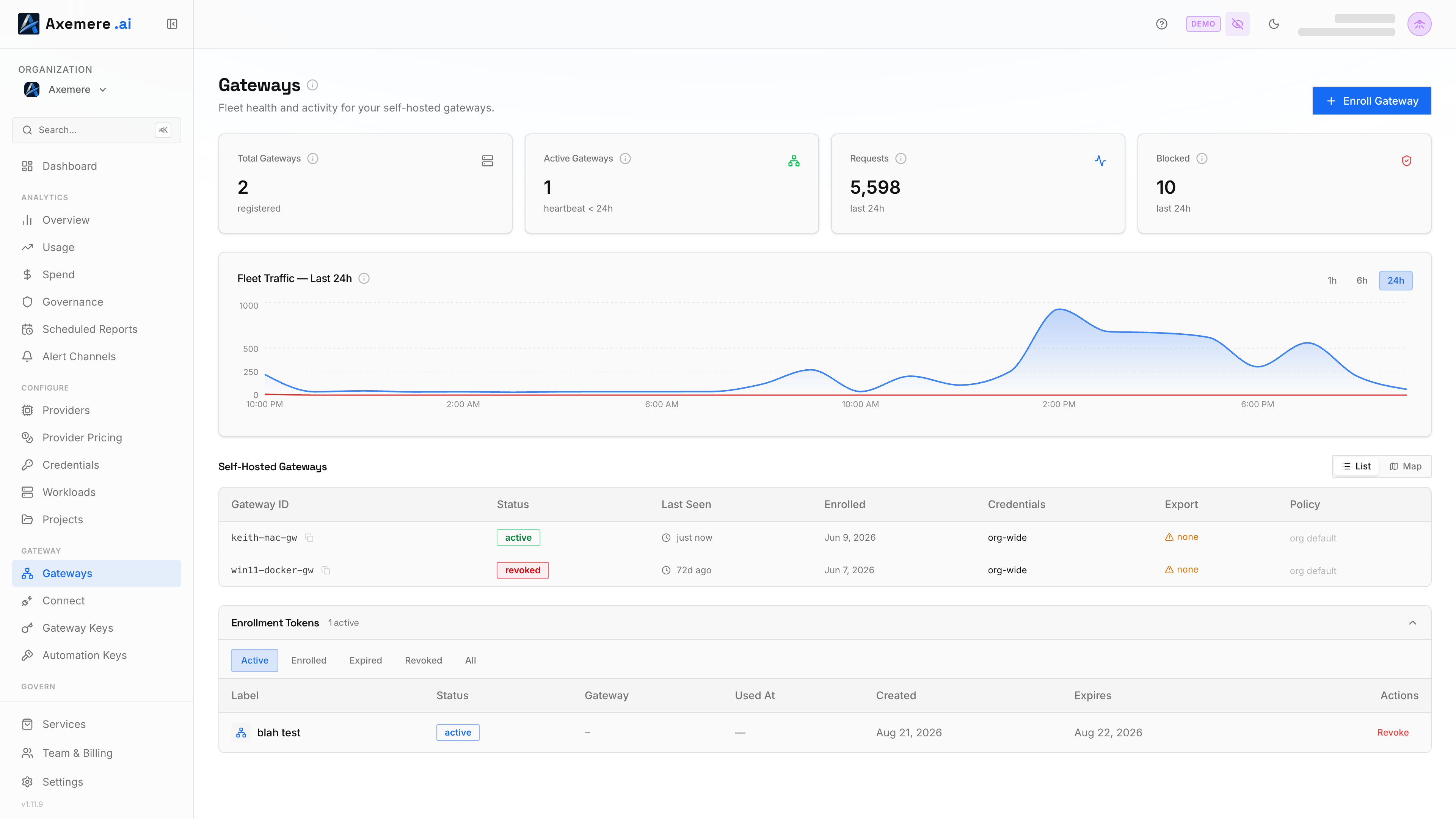
This guide covers managed gateway mode: a multi-tenant deployment model with API key authentication, per-org policy isolation, streaming configuration updates, and usage metering.
Table of Contents
- Overview
- Gateway Modes
- Enabling Managed Mode
- API Key Authentication
- Policy Distribution
- Fleet Configuration and Node Overlays
- Workload Distribution
- Credential Distribution
- Metering and Billing
- Getting Started
- Self-Hosted vs Managed
- CP Enrollment and mTLS
- Operator Configuration
- Troubleshooting
Getting Started
To use the managed gateway as an end user:
- Obtain an API key from your organization admin. Keys are created via Gateway Keys in
the Axemere Console left sidebar, or via the
OrgService.CreateAPIKeygRPC endpoint on the control plane. - Your gateway endpoint:
https://us.gw.axemere.ai - Authenticate by including the API key as a Bearer token:
Authorization: Bearer gwk_<your-api-key> - Send requests to
POST /v1/actions:execute-- theorg_idis derived from your API key automatically.
curl -s -X POST https://us.gw.axemere.ai/v1/actions:execute \
  -H "Authorization: Bearer gwk_<your-api-key>" \
  -H "Content-Type: application/json" \
  -d '{
    "schema": "mvgc.action_request.v2",
    "workload_id": "my-app",
    "action": {
      "type": "ai.infer",
      "method": "POST",
      "target_host": "api.openai.com",
      "params": {"model": "gpt-4o-mini", "messages": [{"role": "user", "content": "Hello"}]}
    }
  }'
TLS is provided by the managed endpoint -- no client certificates needed.
Self-Hosted vs Managed
| Aspect | Self-Hosted | Managed |
|---|---|---|
| Who runs it | You deploy and operate the gateway binary | Axemere operates the fleet |
| Infrastructure | Your Kubernetes cluster / VM / Docker | GKE cluster on Axemere's GCP project |
| CP enrollment | Bootstrap token (customer-created) | Bootstrap token (auto-created at org provisioning) |
| Request auth | None required (single-tenant) | API key per organization (multi-tenant) |
| Config updates | Pull-based (check-in every 60s) | Push-based (gRPC streaming) |
| Policy control | Full local control of all layers | Base bundle + org/node overlays (tier-gated) |
| Offline resilience | Durable policy cache in Postgres | Streaming reconnect with backoff |
| Multi-tenancy | Single org per instance | Multiple orgs, row-level isolation |
| Metering | Local execution records only | Per-org monthly aggregates + plan enforcement |
| Scaling | You manage HPA / replica count | Managed fleet with auto-scaling |
| Cost | Your infrastructure costs | Usage-based pricing per plan tier |
Choose self-hosted when you need full infrastructure control, data residency, or custom deployment topologies. Choose managed when you want zero-ops gateway access with API key authentication and centralized metering.
Overview
Axemere Gateway supports two deployment models:
- Self-hosted gateway -- the customer runs the gateway and pulls configuration updates from the control plane via periodic check-in calls.
- Managed gateway -- the gateway operates as a multi-tenant SaaS service, authenticating requests with API keys, pushing configuration updates via gRPC streaming, and metering usage per organization.
Managed mode adds API key authentication, per-org policy overlays, workload and credential distribution, and monthly usage tracking on top of the existing gateway capabilities.
Gateway Modes
| Feature | Self-Hosted | Managed |
|---|---|---|
| CP enrollment | Bootstrap token → mTLS cert | Bootstrap token → mTLS cert (same flow) |
| Request auth | None (single-tenant) | API key (SHA-256 hashed, multi-tenant) |
| Config distribution | Pull (check-in every 60s) | Push (gRPC streaming) |
| Policy customization | Full local control | Base bundle + org/node overlays |
| Offline resilience | Durable policy cache | Streaming reconnect |
| Metering | Local records only | Per-org monthly aggregates |
| Multi-tenancy | Single org per instance | Multiple orgs, isolated |
| Plan enforcement | N/A | Tier-based overlay restrictions |
Set MVGC_GATEWAY_MODE to select the mode:
| Value | Behavior |
|---|---|
self-hosted (default) | Check-in polling, bootstrap token auth |
managed | Streaming updates, API key auth required |
Enabling Managed Mode
Two environment variables control managed gateway behavior:
| Variable | Description | Default |
|---|---|---|
MVGC_GATEWAY_MODE | Gateway mode: self-hosted (no API key auth, check-in polling) or managed (API key auth enforced, streaming config updates) | self-hosted |
MVGC_CHECKIN_IDLE_THRESHOLD | Check-in polling interval (self-hosted mode only) | 60s |
To enable managed mode:
export MVGC_GATEWAY_MODE=managed
export MVGC_CP_ADDR=cp.example.com:9090
When MVGC_GATEWAY_MODE=managed, every request to the gateway must include a valid API key
in the Authorization header:
Authorization: Bearer gwk_<api-key>
The gateway validates the key by computing its SHA-256 hash and looking it up in the
api_keys table. Validated keys are cached for 30 seconds to reduce database lookups.
If the key is missing, expired, or revoked, the request is rejected with HTTP 401.
In self-hosted mode (default), no API key is required on /v1/actions:execute.
API Key Authentication
API keys are created via the control plane's OrgService.CreateAPIKey gRPC endpoint.
The plaintext key is returned exactly once at creation time -- store it securely.
Creating an API Key
Using grpcurl:
grpcurl -plaintext -d '{
  "org_id": "019508a3-1234-7abc-bdef-000000000001",
  "name": "production-gateway",
  "scopes": ["gateway:execute", "gateway:read"],
  "expires_in": "8760h"
}' cp.example.com:9090 mvgc.v1.OrgService/CreateAPIKey
Response:
{
  "apiKeyId": "ak-019508a3-abcd-7def-9012-000000000001",
  "key": "gwk_abc123...xyz789",
  "expiresAt": "2027-03-24T00:00:00Z"
}
Listing API Keys
grpcurl -plaintext -d '{
  "org_id": "019508a3-1234-7abc-bdef-000000000001"
}' cp.example.com:9090 mvgc.v1.OrgService/ListAPIKeys
Revoking an API Key
grpcurl -plaintext -d '{
  "api_key_id": "ak-019508a3-abcd-7def-9012-000000000001",
  "org_id": "019508a3-1234-7abc-bdef-000000000001"
}' cp.example.com:9090 mvgc.v1.OrgService/RevokeAPIKey
Revoked keys are immediately rejected. The gateway's credential cache evicts revoked keys on the next check-in or streaming update.
Using an API Key
Include the key in every gateway request:
curl -s -X POST https://gw.example.com/v1/actions:execute \
  -H "Authorization: Bearer gwk_abc123...xyz789" \
  -H "Content-Type: application/json" \
  -d '{
    "schema": "mvgc.action_request.v2",
    "workload_id": "my-app",
    "action": {
      "type": "ai.infer",
      "method": "POST",
      "target_host": "api.openai.com",
      "params": {"model": "gpt-4o-mini", "messages": [{"role": "user", "content": "Hello"}]}
    }
  }'
In managed mode, the org_id is derived from the API key -- callers do not need to
supply it explicitly.
Policy Distribution
Axemere Gateway uses different configuration distribution mechanisms depending on the gateway mode.
Self-Hosted: Check-In Based Updates
In self-hosted mode, gateways poll the control plane at a configurable interval
(default 60 seconds) using the RegistryService.CheckIn gRPC call.
The CheckInResponse carries staleness flags for policy, workloads, credentials, and
export config. The gateway fetches updated configurations only when a version is stale,
minimizing bandwidth. min_idle_threshold (int64 seconds) lets the CP adjust the
polling interval server-side.
Configure the check-in interval:
export MVGC_CHECKIN_IDLE_THRESHOLD=60s # default
Managed: Streaming Updates
In managed mode, the gateway establishes a long-lived gRPC stream to the control plane
using ConfigService.SubscribeUpdates. The control plane pushes configuration changes
in real time:
Event types:
| Event | Description |
|---|---|
PolicyUpdatedEvent | New effective bundle available |
WorkloadUpdatedEvent | Workload created, updated, or deleted |
CredentialUpdatedEvent | Credential updated or revoked |
If the stream disconnects, the gateway reconnects with exponential backoff and continues operating with its cached configuration.
Policy Durable Cache
Self-hosted gateways cache the last-known-good policy bundle in the gateway_bundles
Postgres table. If the control plane is unreachable at startup, the gateway loads the
cached bundle and operates normally. The cache is updated after every successful
GetPolicyBundle fetch.
Fleet Configuration and Node Overlays
In managed mode, the control plane supports a layered policy model:
- Base bundle -- the default policy bundle for the org
- Org overlay -- org-level policy customizations (stored in
org_policy_overlays) - Node overlay -- per-node policy overrides (stored in
node_policy_overlays)
These layers are merged to produce an effective bundle
that is cached in the effective_bundles table and distributed to gateways.
Update an org's policy overlay via the PolicyService.UpdateOrgPolicyOverlay gRPC call:
grpcurl -plaintext -d '{
  "org_id": "019508a3-1234-7abc-bdef-000000000001",
  "overlay_yaml": "'"$(base64 < overlay.yaml)"'",
  "updated_by": "admin@example.com"
}' cp.example.com:9090 mvgc.v1.PolicyService/UpdateOrgPolicyOverlay
Overlay YAML follows the same structure as a regular policy bundle but only includes the layers and rules you want to modify. The plan tier determines which layers are permitted in overlays.
Node bundle overrides are stored in node_bundle_overrides and let you assign a
different bundle to specific nodes in a fleet, for example to test a new policy on a
canary node before rolling it out org-wide.
Workload Distribution
In distributed mode (both self-hosted and managed), workload configurations are managed centrally on the control plane and distributed to gateways.
Gateways fetch workloads via WorkloadService.GetWorkloads:
grpcurl -plaintext -d '{
  "org_id": "019508a3-1234-7abc-bdef-000000000001",
  "since_version": "0"
}' cp.example.com:9090 mvgc.v1.WorkloadService/GetWorkloads
The response includes all workloads (or only those changed since since_version) and a
version number. The gateway maintains a workload cache
with a 5-minute TTL. In managed mode, workload changes are also pushed via
WorkloadUpdatedEvent on the streaming channel.
The organizations.workloads_version counter is incremented whenever a workload is
created, updated, or deleted. Check-in responses include this version so gateways know
when to re-fetch.
Credential Distribution
Credential configurations (mode, provider, secret references) are distributed on a per-node basis. Each node fetches only the credentials it is allowed to use:
org_widecredentials are delivered to every node.node_scopedcredentials are delivered only to nodes with an explicit assignment.export_authcredentials are never distributed to nodes; they are resolved server-side when building the export destination list.
Gateways fetch their resolved set via CredentialService.ListNodeCredentials:
grpcurl -plaintext -d '{
  "org_id": "019508a3-1234-7abc-bdef-000000000001",
  "node_id": "a1b2c3d4-e5f6-7890-abcd-ef0123456789"
}' cp.example.com:9090 mvgc.v1.CredentialService/ListNodeCredentials
The credential cache uses a shorter
60-second TTL because credential changes (especially revocations) are security-sensitive.
In managed mode, CredentialUpdatedEvent pushes revocations immediately.
The organizations.credentials_version counter tracks changes; check-in credentials_stale
is set when the gateway's version diverges from the CP's current version.
Security note: Secret values (API keys, tokens) are never transmitted over the wire.
The secret_ref field contains a reference to the secret store -- gateways resolve
secrets locally from the configured secret backend.
Metering and Billing
Managed mode tracks per-org usage for billing and capacity planning.
Plan Tiers
Each organization has a plan tier that controls:
- Which policy overlay layers are permitted
- Monthly request limits
- Monthly token limits
- Whether overage is allowed
| Tier | Permitted overlay layers | Request limit | Token limit |
|---|---|---|---|
starter | identity, budgets | Per plan config | Per plan config |
pro | identity, delegation, targets, credentials, budgets, risk, transforms | Per plan config | Per plan config |
enterprise | All layers + custom connectors | Unlimited | Unlimited |
Permitted overlay layers by tier:
| Layer | Starter | Pro | Enterprise |
|---|---|---|---|
identity | ✓ | ✓ | ✓ |
delegation | — | ✓ | ✓ |
targets | — | ✓ | ✓ |
credentials | — | ✓ | ✓ |
budgets | ✓ | ✓ | ✓ |
risk | — | ✓ | ✓ |
transforms | — | ✓ | ✓ |
| Custom layers | — | — | ✓ |
Plan tiers are stored in the org_plans table and enforced when applying policy overlays.
An overlay referencing a layer not permitted by the plan tier is rejected with an error; this is the most common cause of unexpected UpdateOrgPolicyOverlay failures. Verify the org's tier before submitting an overlay.
When an org exceeds its monthly_request_limit or monthly_token_limit, the gateway
enforces overage rules: if overage_enabled is false (the default), requests are
denied with HTTP 429. If overage_enabled is true, requests continue and are billed
at the overage rate.
Usage Reports
Monthly usage is aggregated in the org_monthly_usage table with the following metrics:
| Metric | Description |
|---|---|
request_count | Total requests processed |
tokens_in | Total input tokens consumed |
tokens_out | Total output tokens generated |
cost_usd_millicents | Total cost in millicents (1/1000 of a cent) |
workloads_active | Number of active workloads during the period |
Usage is aggregated per (org_id, period_start) where period_start is the first day
of the billing month. The gateway increments counters after each successful request.
Querying Usage
The control plane exposes HTTP report endpoints on its metrics server (default :9091):
# Usage report (request counts, tokens, active workloads)
curl -s "http://cp.example.com:9091/v1/reports/usage?org_id=019508a3-1234-7abc-bdef-000000000001"

# Spend report (cost breakdown)
curl -s "http://cp.example.com:9091/v1/reports/spend?org_id=019508a3-1234-7abc-bdef-000000000001"
Troubleshooting
API key rejected (HTTP 401)
- Verify the key has not been revoked:
ListAPIKeysand checkstatusisactive - Check the key has not expired: compare
expires_atwith the current time - Ensure the
Authorizationheader uses theBearerscheme - Confirm
MVGC_GATEWAY_MODE=managedis set on the gateway
Stale policy after overlay update
In self-hosted mode, the gateway may take up to MVGC_CHECKIN_IDLE_THRESHOLD (default
60 seconds) to detect a policy change. To force an immediate update:
- Clear the policy cache via the admin API:
DELETE /v1/admin/policy/cache - Reduce
MVGC_CHECKIN_IDLE_THRESHOLDtemporarily - Or restart the gateway to trigger an immediate check-in
In managed mode, policy changes are pushed immediately via the streaming channel. If the gateway is not receiving updates:
- Check gateway logs for streaming connection errors
- Verify
MVGC_GATEWAY_MODE=managedis set - Ensure the control plane is reachable at
MVGC_CP_ADDR
Overlay rejected by plan tier
If UpdateOrgPolicyOverlay returns an error about disallowed layers:
- Check the org's plan tier in
org_plans - Verify the overlay only references layers permitted by the tier
- Upgrade the plan tier if additional layers are needed
Gateway cannot connect to control plane
- Verify
MVGC_CP_ADDRis correct and reachable - Check TLS certificate configuration (
MVGC_CP_CA_CERT,MVGC_NODE_CERT,MVGC_NODE_CERT_KEY) - In self-hosted mode, the gateway falls back to its durable policy cache if the CP is unreachable -- check logs for "using cached bundle" messages
Credential revocation not taking effect
- In self-hosted mode: wait for the next check-in cycle (up to 60 seconds) or restart
- In managed mode: the
CredentialUpdatedEventshould push immediately -- check the streaming connection is active - The credential cache TTL is 60 seconds; even without a push event, the cache will expire and re-fetch
CP Enrollment and mTLS
Both self-hosted and managed gateways must enroll with the control plane to obtain an mTLS certificate. This certificate authenticates the gateway on all subsequent CP calls (CheckIn, GetPolicyBundle, SubmitRecordHash, etc.). Without it, the CP rejects the connection.
The API key authenticates end-user requests to the gateway. The mTLS certificate authenticates the gateway itself to the control plane. These are separate concerns; a managed gateway needs both.
Self-Hosted: Customer-Initiated Bootstrap
For self-hosted gateways, the customer creates a bootstrap token manually:
-
Create a bootstrap token in the Axemere Console; navigate to Gateways, click + Enroll Gateway, and click Generate Token.
-
Configure the gateway with the token and org ID:
Via environment variables:
export MVGC_BOOTSTRAP_TOKEN="<token from step 1>"
export MVGC_ORG_ID="<your org id>"
export MVGC_CP_ADDR="us.cp.axemere.ai:9090"
export MVGC_NODE_ID="my-gateway-01"
Or in
mvgc.yaml(see Config File):control_plane: addr: "us.cp.axemere.ai:9090" bootstrap_token: "<token from step 1>" gateway: org_id: "<your org id>" node_id: "my-gateway-01" -
Start the gateway. On first boot,
runMTLSProvisioningdetects no cert on disk, generates a keypair and CSR, callsRegisterNode(which is exempt from mTLS), and receives a 90-day certificate. The cert is stored toMVGC_KEY_DIR(default./keys). -
The bootstrap token is consumed on first successful enrollment and cleared automatically; it does not need to be removed from the config file manually. All subsequent starts load the cert from disk.
Managed: Automated Bootstrap at Org Provisioning
Managed gateways have no customer performing manual steps. The bootstrap token is created automatically as part of the org provisioning workflow:
The platform API orchestrates this automatically when a new org is onboarded. The operator
never handles tokens manually. After enrollment, the MVGC_BOOTSTRAP_TOKEN value in the
Helm release can be cleared; it has been consumed and cannot be reused.
Certificate Lifecycle
After initial enrollment, the cert lifecycle is identical for both self-hosted and managed:
| Event | What happens |
|---|---|
| Gateway starts, cert valid | Loads cert from disk / K8s Secret; connects with mTLS |
| Gateway starts, cert absent | Uses MVGC_BOOTSTRAP_TOKEN to enroll (one-time) |
| Cert enters 14-day renewal window | Gateway calls RenewCert RPC, authenticated via existing cert; no bootstrap token needed |
| Cert renewed | New cert written to MVGC_KEY_DIR; active immediately |
| All pods down for 14+ days, cert expires | Re-enrollment needed with a new bootstrap token |
Self-renewal means zero operator intervention after initial enrollment. The gateway manages its own cert lifecycle indefinitely.
For the full mTLS design including CP enforcement and threat model, contact your Axemere representative.
Operator Configuration
For operators deploying a custom managed gateway fleet (rather than using Axemere's hosted
service), set MVGC_GATEWAY_MODE=managed on the gateway pods. This enables:
- Streaming configuration updates via
ConfigService.SubscribeUpdates - Push-maintained API key auth map (no check-in polling)
- Per-org monthly usage metering
Key environment variables for managed fleet operators:
| Variable | Description | Default |
|---|---|---|
MVGC_GATEWAY_MODE | Set to managed to enable streaming config and API key auth | self-hosted |
MVGC_CP_ADDR | Control plane gRPC address (host:port) | (required) |
MVGC_ORG_ID | Organization ID for this gateway | (required) |
MVGC_NODE_ID | Stable identity for this gateway deployment | (required) |
MVGC_BOOTSTRAP_TOKEN | One-time enrollment token (consumed on first boot; can be removed after) | (empty) |
MVGC_KEY_DIR | Directory for mTLS cert and key storage (K8s Secret volume for managed) | ./keys |
MVGC_CP_TOKEN | Bearer token for CP admin gRPC services (required when CP runs with MVGC_CP_ADMIN_TOKEN) | (empty) |
MVGC_SKIP_MIGRATION | Skip DB migration at start; use mvgc-gateway migrate instead | false |
MVGC_HEALTHZ_STARTUP_GRACE | Startup grace period for /healthz (returns "starting" during warmup) | 10s |
Contact Axemere support if you need additional infrastructure configuration details.
See also:
- Glossary for term definitions
- Policies for policy DSL and administration
- Developer Integration Guide for request/response schemas
- IT Setup Guide for deployment instructions
- IT Setup Guide for Kubernetes and Docker deployment details