
Workloads
Credentials | Workloads | Policies
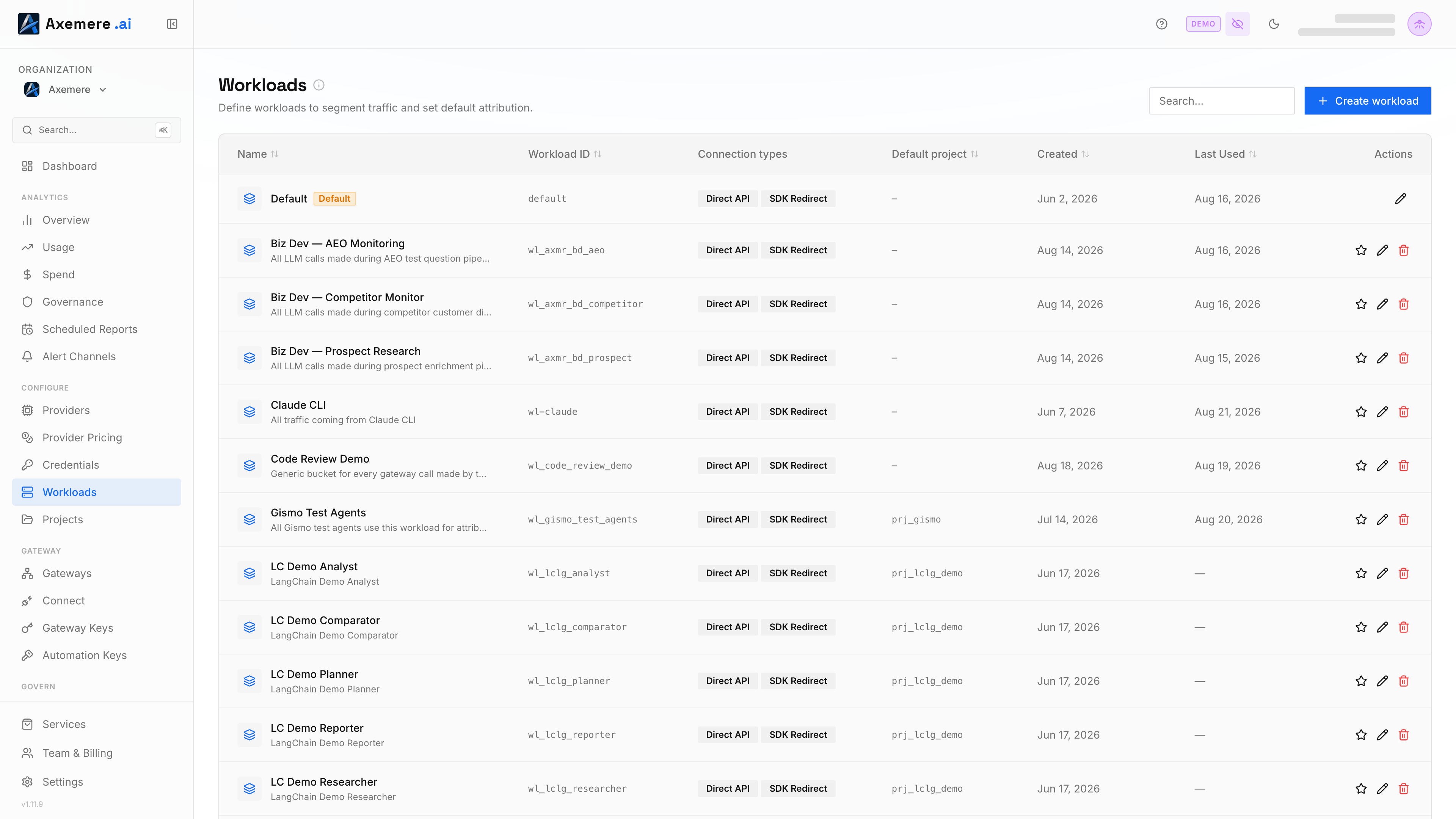
A workload is a named identity scope within your organization. Requests tagged with a workload ID are grouped for policy evaluation, attribution defaults, and spend tracking. You decide how to map workloads to your systems; common patterns include one workload per application, per team, per environment, or per deployment tier.
Table of Contents
- Managing workloads in the console
- Identity and attribution scopes
- Managing workloads on the Self-Hosted Gateway
- Related Topics
Managing workloads in the console
Go to Workloads in the left nav. From there you can:
- Add a workload: enter a name (required) and optionally a workload ID (auto-generated if left blank); the console creates it in your org automatically
- View workloads: see all registered workloads and their attribution defaults
- Edit a workload: update the name, allowed connection types, description, default labels, and the default attribution fields (project/account/customer ID). The edit form pre-populates from the workload's current values, so leaving a field as-is keeps it unchanged and blanking a field clears it — saving doesn't touch fields you never opened the form for.
- Delete a workload: removes the workload registration; existing records are retained
When your org is created, a default workload is provisioned automatically so you can start sending requests immediately without a separate registration step. All traffic is attributed to this workload until you create additional workloads and configure your callers to pass the appropriate workload ID.
Identity and attribution scopes
Every request carries an org_id (the tenant) and, independently, a workload_id and a
project_id. workload_id and project_id are not a parent/child hierarchy — a project
is never owned by a single workload, and many workloads can attribute spend to the same
project.
| Field | Scope | Example |
|---|---|---|
org_id | Tenant / organization | aorg_01jabc... |
workload_id | Named scope within the org — policy evaluation, risk baselines, spend tracking | wl_chatbot_prod |
project_id | Billing / chargeback bucket — independent of which workload(s) attribute to it | prj_chatbot_v2 |
A workload can configure a default_project_id (see Field reference
below) as a convenience: when a caller's request omits project_id, the gateway fills it in
from the workload's default before falling back to the org's own default. This is a fallback
value, not a structural link — a single workload's requests can still freely specify any
project_id explicitly, and deleting or renaming a project never affects the workloads that
happen to default to it.
Risk scoring baselines are maintained per workload; a spike on one workload does not affect the score for another. See Risk Scoring for how baselines and signals work.
Managing workloads on the Self-Hosted Gateway
Location: configs/workloads/workloads.yaml (env: MVGC_WORKLOADS_DIR)
File structure
workloads:
  - workload_id: wl_prod_app_1
    org_id: org-example-001
    name: "Production Application"
    default_project_id: prj_default
    default_account_id: acct-default
    default_customer_id: cust-default

  - workload_id: wl_dev_app_1
    org_id: org-example-001
    name: "Development Application"
    default_customer_id: cust-dev
    default_account_id: acct-dev
    default_project_id: prj_dev
    default_labels:
      env: dev
    allowed_connection_types:
      - direct_api
Field reference
| Field | Type | Required | Description |
|---|---|---|---|
workload_id | string | yes | Unique identifier for this workload. Passed in each request. The gateway force-prefixes any request-supplied workload_id/project_id that doesn't already start with wl_/prj_ — register this field already in that form, or a real request's auto-prefixed value will never match what you registered here. |
org_id | string | yes | Organization this workload belongs to. Must match MVGC_ORG_ID when set. |
name | string | yes | Human-readable display name shown in the console. |
description | string | no | Optional longer description (informational). |
default_project_id | string | no | Default project identifier applied when the caller omits it. |
default_account_id | string | no | Default billing account identifier applied when the caller omits it. |
default_customer_id | string | no | Default customer identifier for chargeback applied when the caller omits it. |
default_labels | map[string]string | no | Arbitrary key-value pairs attached to execution records for reporting and filtering. Applied when the caller omits labels. |
allowed_connection_types | []string | no | Restricts which connection types this workload may use. When omitted, all types are permitted. See allowed_connection_types valid values. |
Default attribution fields
The default_project_id, default_account_id, default_customer_id, and default_labels fields are applied to execution records when the caller does not supply them. They allow you to set a consistent chargeback and reporting baseline for a workload without requiring every caller to pass attribution fields on every request.
allowed_connection_types valid values
Each execution record carries two independent dimensions that describe how the request arrived:
Connection Type — the transport mechanism:
| Value | UI label | Description |
|---|---|---|
direct_api | Direct API | App called the gateway using the Axemere wire format (POST /v1/actions:execute). |
sdk_redirect | SDK Redirect | AI SDK was pointed at the gateway via base-URL redirect (e.g. ANTHROPIC_BASE_URL=http://localhost:7080/proxy/anthropic/). |
connect_proxy | System Proxy | App used an OS-level HTTPS proxy; gateway intercepted via TLS inspection. |
Traffic Class — the behavioral intent (recorded per request; not a workload restriction):
| Value | UI label | Description |
|---|---|---|
developer | Developer | Deliberate per-session routing: SDK calls, CLI tools, or a manually set proxy. |
ambient | Ambient | Autonomous background traffic from apps configured once via mvgc-gateway install or a PAC file. |
allowed_connection_types restricts the first dimension only. When omitted (the default in the Customer Console), all connection types are permitted. To restrict a workload to direct API calls only:
allowed_connection_types:
  - direct_api
Pushing workloads at runtime
Register a workload
curl -X PUT http://localhost:7080/v1/admin/workloads \
  -H "MVGC-Admin-Token: $MVGC_ADMIN_TOKEN" \
  -H "Content-Type: application/json" \
  -d '{
    "workload_id": "wl_prod_app_1",
    "org_id": "org-example-001",
    "name": "Production Application",
    "default_project_id": "prj_default",
    "default_account_id": "acct-default",
    "default_customer_id": "cust-default",
    "allowed_connection_types": ["direct_api"]
  }'
Related Topics
- Policies — how the identity layer uses workload_id in policy conditions
- Risk Scoring — per-workload behavioral anomaly detection