
Credentials
Credentials | Workloads | Policies
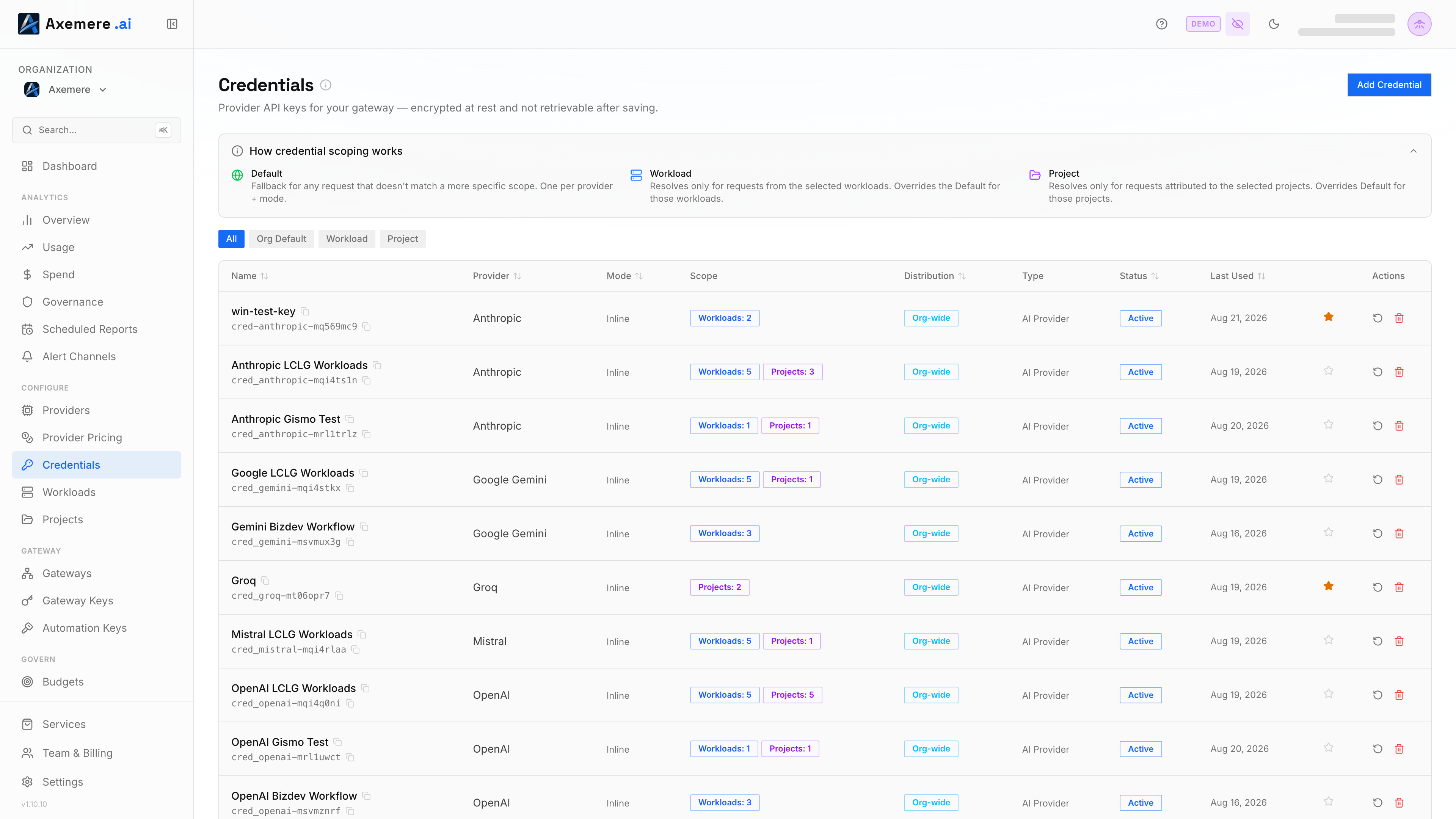
Credentials give the gateway access to AI provider APIs. How you manage them depends on your deployment:
| Deployment | How credentials are managed |
|---|---|
| Managed Gateway | Add credentials in the console; Axemere stores and delivers them to your gateway fleet securely. No files or environment variables needed. |
| Self-Hosted Gateway | Add credentials in the console; the Control Plane (CP) pushes them to your gateway automatically. You can also configure credentials via credentials.yaml using alias mode if you prefer to keep secrets off the CP, though this forgoes automatic distribution and rotation. |
| Free Gateway | Configure credentials in credentials.yaml on your gateway host. Secrets can be read from environment variables, stored inline, or supplied per-request by the caller. |
Table of Contents
- Managing credentials in the console
- [Managing credentials on the Free Gateway](#managing-credentials-on-the-Free Gateway)
- Related Topics
Managing credentials in the console
Go to Credentials in the left nav. From there you can:
- Add a credential: select the provider, enter a name, and paste your API key
- View credentials: see provider, mode, and billing owner for each entry
- Delete a credential: removes the credential and its associated policy rules
The console stores credentials securely and distributes them to your gateway automatically. No YAML files needed.
How the console manages policy rules
When you add a credential in the console, the Control Plane (CP) automatically generates policy rules that allow traffic to that provider; you do not need to configure policies manually for basic access. When you delete a credential, those rules are removed and traffic to that provider is denied.
AWS Bedrock: two credential types
AWS Bedrock accepts two different credential shapes, and the console's Add Credential form asks which one you're using before showing the matching fields:
| Type | Fields | Generate it from |
|---|---|---|
| Bedrock API key | One long-term bearer token | Bedrock console → API keys (left nav) |
| Access key + secret (SigV4) | IAM access key ID + secret access key | IAM console → Security credentials |
The console preselects Bedrock API key: it's the one-field path, and the one most users already hold after following AWS's current getting-started docs. AWS recommends access key + SigV4 for production workloads; long-term API keys are intended for exploration and development. The form shows this recommendation inline when API key mode is selected.
Region is required in both modes; Bedrock's runtime endpoint is
bedrock-runtime.<region>.amazonaws.com regardless of credential type.
Internally, both shapes are encoded as JSON inside the credential's secret_ref, discriminated
by an auth_type field:
// Bedrock API key
{"auth_type": "api_key", "api_key": "…", "region": "us-east-1"}

// Access key + secret (SigV4)
{"auth_type": "sigv4", "access_key_id": "AKIA…", "secret_access_key": "…", "region": "us-east-1"}
A credential created before this distinction existed has no auth_type field. The gateway
infers sigv4 for those, since that was the only shape available at the time; no migration is
needed for existing Bedrock credentials.
Managing credentials on the Free Gateway
Location: configs/credentials/credentials.yaml (env: MVGC_CREDENTIALS_DIR)
The credentials file registers AI provider API keys for free (self-hosted) gateway deployments.
File structure
credentials:
  - credential_id: cred-openai
    provider: openai
    mode: alias
    billing_owner: customer
    secret_ref: OPENAI_API_KEY
    created_at: "2026-03-15T00:00:00Z"
    updated_at: "2026-03-15T00:00:00Z"
Field reference
| Field | Type | Required | Description |
|---|---|---|---|
credential_id | string | yes | Unique identifier referenced by policy rules and the admin API. Convention: cred-<provider>[-suffix]. Does not affect secret resolution -- the env var name is set separately in secret_ref. |
provider | string | yes | Identifies the AI provider and determines which connector handles requests for this credential. provider and connector_id use the same values today. See provider valid values. |
mode | string | yes | Credential resolution mode. See mode valid values. |
billing_owner | string | yes | Who is billed for usage. See billing_owner valid values. |
secret_ref | string | alias, inline | For alias mode: name of the environment variable the gateway reads at runtime (os.Getenv(secret_ref)). For inline mode: the literal API key value. Required when mode is alias or inline. |
org_id | string | no | Org scope for this credential. Populated automatically when registered via the admin API. |
connector_id | string | no | Pin this credential to a specific connector. When omitted, the credential's provider value determines connector routing. |
scopes | []string | no | Human-readable permission scopes (informational; not evaluated by the policy engine). |
override_base_url | string | no | Override the default base URL for this provider. Useful for testing or private endpoints. |
created_at | RFC3339 | no | Creation timestamp (informational). |
updated_at | RFC3339 | no | Last-modified timestamp (informational). |
credential_idvssecret_ref:credential_idis a logical name used in policy rules and API calls.secret_refis the name of the environment variable the gateway reads to obtain the actual API key. There is no automatic derivation between them. For example, a credential withcredential_id: cred-openaiandsecret_ref: OPENAI_API_KEYmeans policy rules reference it ascred-openai, while the gateway resolves the secret by callingos.Getenv("OPENAI_API_KEY"). You can name either field however you like, as long as they are consistent within your deployment.
provider valid values
| Value | Provider | API Base URL |
|---|---|---|
openai | OpenAI | api.openai.com |
anthropic | Anthropic | api.anthropic.com |
gemini | Google Gemini | generativelanguage.googleapis.com |
azure_openai | Azure OpenAI Service | *.openai.azure.com |
cohere | Cohere | api.cohere.com |
generic_http | Generic HTTP (catch-all) | any |
Each provider maps 1:1 to a dedicated connector with provider-specific logic for auth headers, token counting, and streaming. The
connector_idfield in policy effects and theproviderfield on credentials use the same values today. In a future release these may diverge -- for example, to support multiple connector versions for a single provider, or a single connector that serves multiple providers.
mode valid values
| Value | Name | Description |
|---|---|---|
byok | Bring Your Own Key | The caller passes the API key in the request. The gateway forwards it to the target without storing it. |
alias | Key Alias | The gateway holds a reference to an API key stored in an environment variable (secret_ref). The key is injected server-side; the caller never sees it. |
inline | Inline Secret | The API key is stored directly as the secret_ref value in credentials.yaml. No environment variable is needed. Treat the credentials file as sensitive when using this mode. |
brokeredandattestedmodes are reserved for future use.
billing_owner valid values
| Value | Meaning |
|---|---|
customer | The customer (your org) is billed directly by the AI provider. |
platform | The gateway operator is billed; costs are re-attributed to the customer internally. |
How secrets are resolved
For alias mode the gateway reads the named environment variable at request time. The
recommended way to supply these is via the env: section of mvgc.yaml: values there
are injected into the process environment at startup and never override variables already
set by the shell or service manager:
# mvgc.yaml
env:
  OPENAI_API_KEY: "sk-..."
  ANTHROPIC_API_KEY: "sk-ant-..."
  GEMINI_API_KEY: "AIza..."
  AZURE_OPENAI_API_KEY: "..."
  COHERE_API_KEY: "..."
Alternatively, set them directly in the process environment (shell export, systemd
EnvironmentFile, or Docker Compose .env). Direct process env vars always take
precedence over the env: section.
For inline mode, set secret_ref to the literal API key in credentials.yaml and omit the environment variable. Treat credentials.yaml as a sensitive file (same as .env) when using this mode.
credentials:
  - credential_id: cred-openai-inline
    provider: openai
    mode: inline
    billing_owner: customer
    secret_ref: "sk-your-openai-api-key-here"
Pushing credentials at runtime
Register a credential
curl -X PUT http://localhost:7080/v1/admin/credentials \
  -H "MVGC-Admin-Token: $MVGC_ADMIN_TOKEN" \
  -H "Content-Type: application/json" \
  -d '{
    "credential_id": "cred-openai",
    "provider": "openai",
    "mode": "alias",
    "billing_owner": "customer",
    "secret_ref": "OPENAI_API_KEY"
  }'
Reload all credentials from file
If you edit credentials.yaml on disk after the gateway is already running, use this endpoint to
apply the file contents without a restart. All credentials in the file are upserted (overwriting
any current DB values):
curl -s -X POST http://localhost:7080/v1/admin/credentials/reload \
  -H "MVGC-Admin-Token: $MVGC_ADMIN_TOKEN" | jq .
The gateway reads every *.yaml file from MVGC_CREDENTIALS_DIR and upserts each entry.
Trust model: alias vs inline
Choosing a credential mode is a trust model decision:
| Mode | Who holds the secret | Use case |
|---|---|---|
alias | Gateway host environment (env var) | Self-hosted; operator controls the gateway machine |
inline | CP database; secret delivered to gateway over mTLS | Axemere-managed gateways |
byok | Caller (per-request) | Developer testing; untrusted callers who provide their own key |
Reserve inline for managed gateways. For self-hosted deployments, alias keeps secrets off
the control plane entirely.
Fail-fast on missing credential secret
When policy allows a request but the target is a known AI provider and no credential secret can be resolved (empty env var, missing alias, no matching credential), the gateway returns HTTP 403 with an actionable message rather than forwarding the request unauthenticated. This prevents opaque upstream 401 errors and makes misconfigured credentials immediately visible.
Related Topics
- Policies — credential selection in policy rules