
Providers
For: Platform operators enabling and configuring AI provider access on Axemere Gateway.
Providers | Provider Pricing | Credentials | Workloads | Projects
The Providers page is where you enable AI providers (OpenAI, Anthropic, etc.) and configure how the gateway authenticates to each one. By default, all provider traffic is blocked until explicitly enabled here.
Navigation: console.axemere.ai/providers
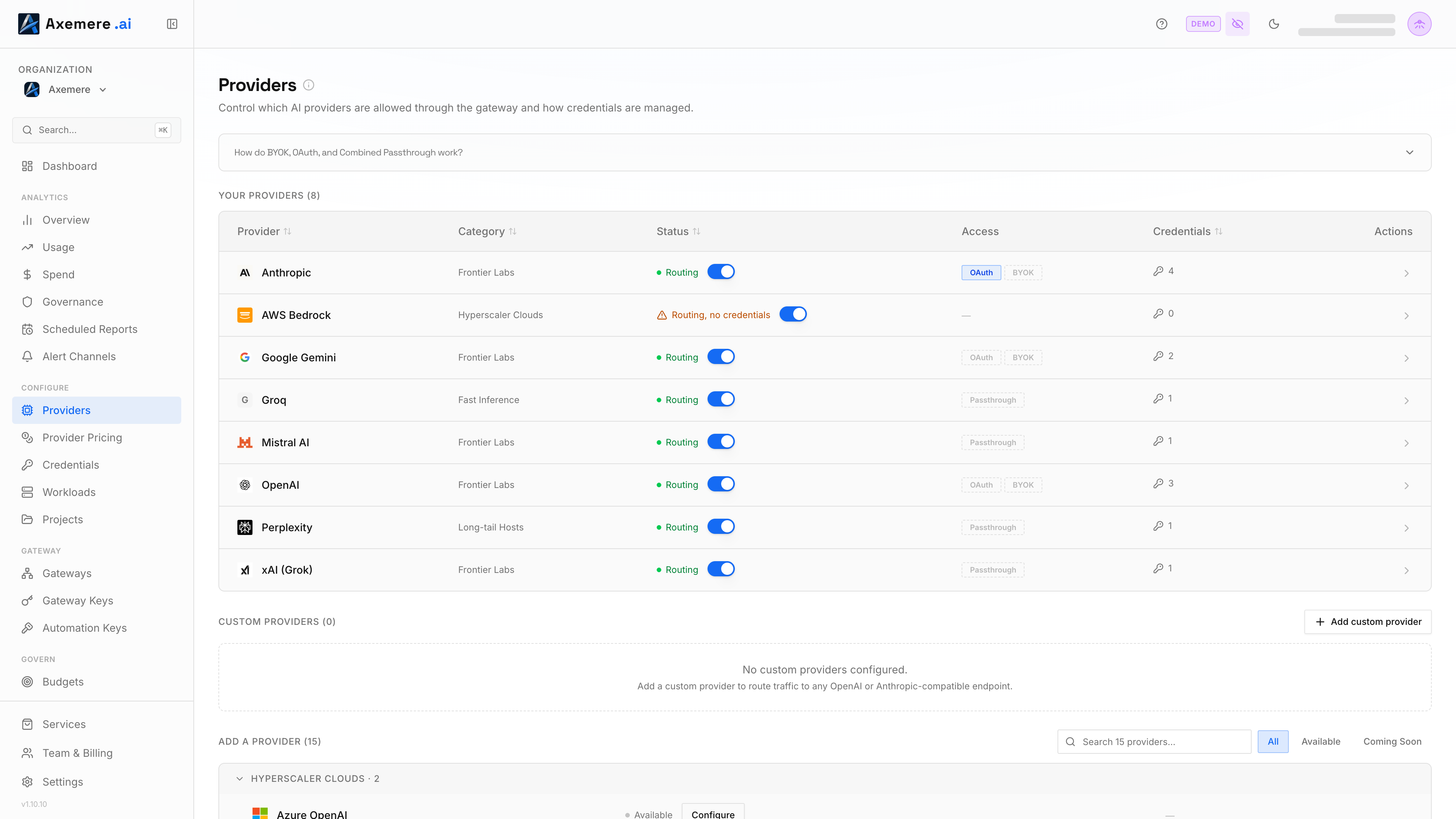
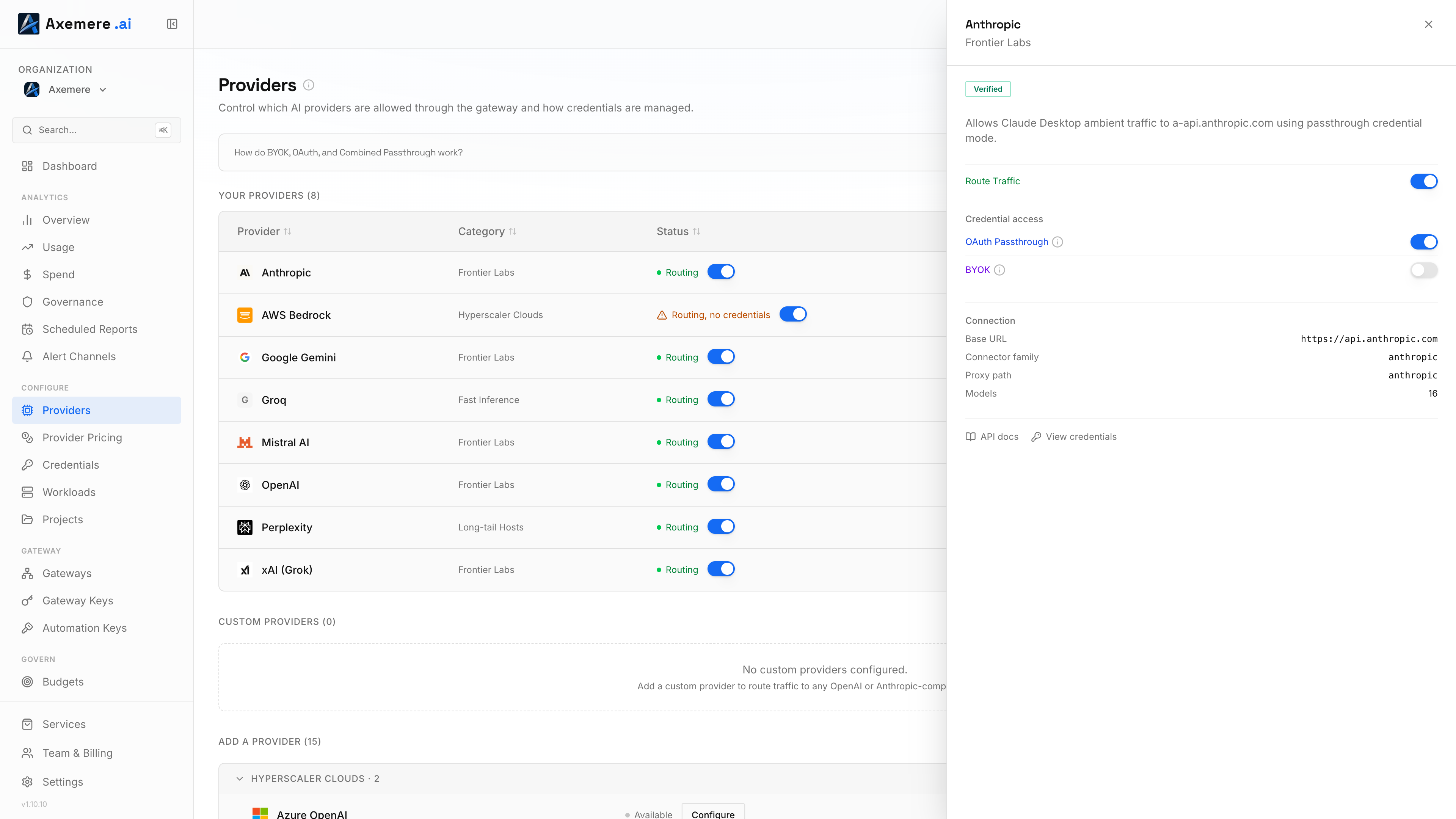
Table of Contents
- Your Providers and the Catalog
- Credential Modes
- Custom Providers
- Traffic Add-ons
- Setting Custom Pricing
Your Providers and the Catalog
The Providers page has two zones:
- Your Providers: the providers you've already configured (routing enabled, a credential stored, or an access mode turned on). Each row has an inline Route Traffic switch, so you can flip routing on or off without opening anything.
- Add a Provider: the full catalog of built-in providers you haven't configured yet, grouped into collapsible categories (Frontier Labs, Hyperscaler Clouds, Fast Inference, Aggregators & Routers, Enterprise Data Platforms, Regional & China, Long-tail Hosts, Self-hosted & Custom). Frontier Labs is expanded by default; the rest collapse until you open them. Use the search box and the All / Available / Coming soon filter to narrow it down. Each catalog row shows a read-only status label and a Configure button instead of a switch, since there's nothing to route yet.
Clicking any row, in either zone, opens the same detail drawer for that provider: the credential modes it supports, connection info (base URL, connector family, proxy path, model count), and links to its API docs and to Credentials. This is where you turn on OAuth, BYOK, or Combined Passthrough; those toggles live in the drawer, not inline in the table.
Built-in providers include: OpenAI, Anthropic, Google Gemini, Cohere, Azure OpenAI, and others. The exact list is determined by your gateway version.
All Built-in Providers
Not every built-in provider is shown in the catalog yet, but all 23 work today over Transparent Proxy, using the same prefix: /proxy/{provider_id}/k/<your-axemere-key>/w/<workload-id>/.... If a provider you need isn't in the catalog, you can still route to it directly using its provider_id from the table below.
The prefix is uniform; the path after it is not. The gateway does zero path translation: whatever path your client sends after the prefix is forwarded verbatim to the provider's own API, so it must match that provider's real path convention, not a generic /v1/chat/completions assumption. Gemini and Perplexity are two built-in providers that don't follow OpenAI's convention; see Gemini SDK and Perplexity for their exact paths and auth headers.
| Family | Providers (provider_id) |
|---|---|
| Native | openai, anthropic, gemini, cohere, azure_openai |
OpenAI-compatible (openai_compat) | deepseek, mistral, perplexity, xai, groq, together, fireworks, openrouter, nvidia-nim, upstage, qwen, moonshot, minimax, bytedance, stepfun, zhipu |
| Signed-request | bedrock (AWS SigV4), vertex (GCP) |
For openai_compat and anthropic_compat-family providers, point your SDK's base-URL env var at /proxy/{provider_id}/k/<your-axemere-key>/w/<workload-id>/... and set the API key env var to a placeholder; Axemere injects the real provider credential server-side. See Gateway Keys → Using a Key for the exact env var per SDK.
azure_openai, bedrock, and vertex need provider-specific setup (a customer-specific hostname or a signed-request credential) rather than the generic pattern above; see Credentials for their setup requirements.
Credential Modes
Each provider supports one or more credential modes that determine how the gateway handles authentication to the upstream API. Some providers offer multiple modes simultaneously; enable the ones your use case requires.
Route Traffic (Org Credential)
The gateway uses a provider API key you've stored in Credentials. Your applications do not need to provide a provider key; they authenticate only to the Axemere gateway.
- Best for: Internal tooling, centralized cost control, key rotation without client changes.
- Requires: A credential entry in Credentials for this provider.
OAuth (User Authentication)
The end user authenticates directly with the provider via OAuth. The gateway forwards an OAuth token but does not manage a shared org credential.
- Best for: User-facing applications where each user has their own provider account.
- Requires: OAuth app configuration with the provider.
BYOK (Bring Your Own Key)
The client supplies the provider API key in the request. The gateway proxies it transparently without storing or managing provider credentials. When enabled and a user provides their own key, it takes priority over your org's stored credential: the org key is not used and charges go to the user's account. When disabled, user-supplied keys are ignored and the org key is always used.
- Best for: Developer tools, multi-tenant SaaS where each customer supplies their own key.
- Requires: Nothing on the Axemere side; the client provides the key per-request.
Combined Passthrough
OAuth and BYOK are shown as separate toggles above, but not every provider lets the gateway tell them apart. For providers where an OAuth subscription token and a BYOK API key arrive in the same header with no distinguishing format (currently Anthropic and OpenAI, both using Authorization: Bearer <value>), the console shows a single Combined Passthrough toggle instead of independent OAuth and BYOK toggles.
When enabled, any non-empty Authorization: Bearer value the client sends takes priority over your org's stored credential and is forwarded upstream as-is; the gateway can't verify whether it's a real OAuth token, a real API key, or something else, like an SDK placeholder.
If you're relying on your org's stored key for a provider (the Route Traffic case), leave Combined Passthrough off for that provider. Turning it on while relying on a stored credential means any placeholder value your SDK sends (
"placeholder","unused", etc., see Using a Key) silently overrides it: the provider rejects the placeholder with its own 401, and nothing in the console flags what actually happened.
- Best for: Providers where you genuinely want callers to supply their own OAuth token or API key, and the two can't be told apart.
- Requires: Nothing on the Axemere side.
See Credential Modes for the full mechanism and a troubleshooting entry.
Custom Providers
If you proxy requests through a non-standard endpoint (e.g., Azure OpenAI with a custom deployment URL, or a private model server), you can register it as a custom provider. These live in their own Custom Providers table below Your Providers and the catalog.
- Click Add custom provider.
- Enter a display name and the base URL for the upstream API.
- Optionally add a description (this also pre-populates the form if you later ask Axemere to promote it to a verified catalog connector), an authentication header, a logo URL, and a docs URL.
- Save. The provider appears as a row in the Custom Providers table.
Each row shows its compat type, its current per-token pricing (or "Pricing not set" if you haven't configured one; see Setting Custom Pricing), a Test button to verify the connection, and links to its docs and to Credentials. If a catalog provider shares the same base URL as one of your custom providers, the row flags that a verified version is available.
For a full reference on custom connector configuration across all gateway types (including self-hosted YAML-based connectors), see Custom Connectors.
See NVIDIA NIM — Self-Hosted Containers for a worked example of registering a self-hosted inference server this way.
Traffic Add-ons
Below the provider list, Traffic Add-ons control gateway-level behaviors that apply across providers. Enabling them merges additional rules into your effective policy automatically. Examples include specific model allow/deny lists and request-level controls.
Setting Custom Pricing
The Providers page doesn't have a per-provider Pricing link. Go to the Provider Pricing page directly and add an override there; the connector dropdown includes both built-in and custom providers. Use this when the gateway's built-in cost model doesn't match your actual rates (e.g., when using a proxy with different pricing tiers).
For a custom provider, you can also see its current override (or confirm none is set) inline in the Custom Providers table, without leaving the Providers page.
Related: Credentials | Provider Pricing | Credential Modes | Custom Connectors