
Workloads
Credentials | Workloads | Policies
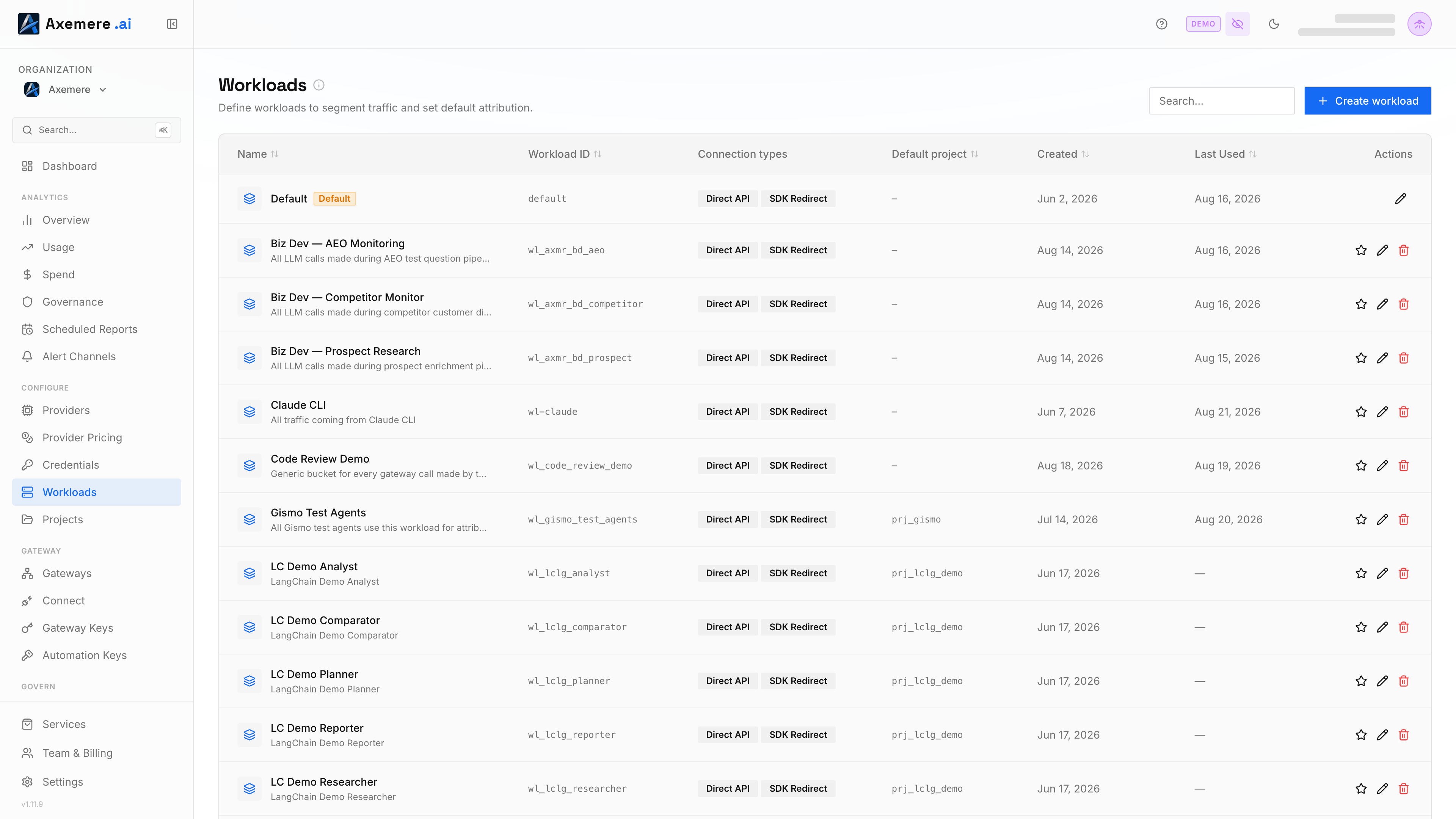
A workload is a named identity scope within your organization. Requests tagged with a workload ID are grouped for policy evaluation, attribution defaults, and spend tracking. You decide how to map workloads to your systems; common patterns include one workload per application, per team, per environment, or per deployment tier.
Table of Contents
- Managing workloads in the console
- Identity hierarchy
- [Managing workloads on the Free Gateway](#managing-workloads-on-the-Free Gateway)
- Related Topics
Managing workloads in the console
Go to Workloads in the left nav. From there you can:
- Add a workload: enter a name (required) and optionally a workload ID (auto-generated if left blank); the console creates it in your org automatically
- View workloads: see all registered workloads and their attribution defaults
- Delete a workload: removes the workload registration; existing records are retained
When your org is created, a default workload is provisioned automatically so you can start sending requests immediately without a separate registration step. All traffic is attributed to this workload until you create additional workloads and configure your callers to pass the appropriate workload ID.
Identity hierarchy
The gateway uses a layered identity model. A workload sits at the second level and scopes all requests that carry its ID.
| Level | Field | Scope | Example |
|---|---|---|---|
| 1 | org_id | Tenant / organization | org-acme-corp |
| 2 | workload_id | Named scope within the org | wl-chatbot-prod |
| 3 | project_id | Billing / chargeback bucket | proj-chatbot-v2 |
Risk scoring baselines are maintained per workload; a spike on one workload does not affect the score for another. See Risk Scoring for how baselines and signals work.
Managing workloads on the Free Gateway
Location: configs/workloads/workloads.yaml (env: MVGC_WORKLOADS_DIR)
File structure
workloads:
  - workload_id: wl-prod-app-1
    org_id: org-example-001
    name: "Production Application"
    default_project_id: proj-default
    default_account_id: acct-default
    default_customer_id: cust-default

  - workload_id: wl-dev-app-1
    org_id: org-example-001
    name: "Development Application"
    default_customer_id: cust-dev
    default_account_id: acct-dev
    default_project_id: proj-dev
    default_labels:
      env: dev
    allowed_connection_types:
      - direct_api
Field reference
| Field | Type | Required | Description |
|---|---|---|---|
workload_id | string | yes | Unique identifier for this workload. Passed in each request. |
org_id | string | yes | Organization this workload belongs to. Must match MVGC_ORG_ID when set. |
name | string | yes | Human-readable display name shown in the console. |
description | string | no | Optional longer description (informational). |
default_project_id | string | no | Default project identifier applied when the caller omits it. |
default_account_id | string | no | Default billing account identifier applied when the caller omits it. |
default_customer_id | string | no | Default customer identifier for chargeback applied when the caller omits it. |
default_labels | map[string]string | no | Arbitrary key-value pairs attached to execution records for reporting and filtering. Applied when the caller omits labels. |
allowed_connection_types | []string | no | Restricts which connection types this workload may use. When omitted, all types are permitted. See allowed_connection_types valid values. |
Default attribution fields
The default_project_id, default_account_id, default_customer_id, and default_labels fields are applied to execution records when the caller does not supply them. They allow you to set a consistent chargeback and reporting baseline for a workload without requiring every caller to pass attribution fields on every request.
allowed_connection_types valid values
Each execution record carries two independent dimensions that describe how the request arrived:
Connection Type — the transport mechanism:
| Value | UI label | Description |
|---|---|---|
direct_api | Direct API | App called the gateway using the Axemere wire format (POST /v1/actions:execute). |
sdk_redirect | SDK Redirect | AI SDK was pointed at the gateway via base-URL redirect (e.g. ANTHROPIC_BASE_URL=http://localhost:7080/proxy/anthropic/). |
connect_proxy | System Proxy | App used an OS-level HTTPS proxy; gateway intercepted via TLS inspection. |
Traffic Class — the behavioral intent (recorded per request; not a workload restriction):
| Value | UI label | Description |
|---|---|---|
developer | Developer | Deliberate per-session routing: SDK calls, CLI tools, or a manually set proxy. |
ambient | Ambient | Autonomous background traffic from apps configured once via mvgc-gateway install or a PAC file. |
allowed_connection_types restricts the first dimension only. When omitted (the default in the Customer Console), all connection types are permitted. To restrict a workload to direct API calls only:
allowed_connection_types:
  - direct_api
Pushing workloads at runtime
Register a workload
curl -X PUT http://localhost:7080/v1/admin/workloads \
  -H "MVGC-Admin-Token: $MVGC_ADMIN_TOKEN" \
  -H "Content-Type: application/json" \
  -d '{
    "workload_id": "wl-prod-app-1",
    "org_id": "org-example-001",
    "name": "Production Application",
    "default_project_id": "proj-default",
    "default_account_id": "acct-default",
    "default_customer_id": "cust-default",
    "allowed_connection_types": ["direct_api"]
  }'
Related Topics
- Policies — how the identity layer uses workload_id in policy conditions
- Risk Scoring — per-workload behavioral anomaly detection