
Providers
The Providers page controls which AI providers are allowed through the gateway and how credentials for each provider are managed.
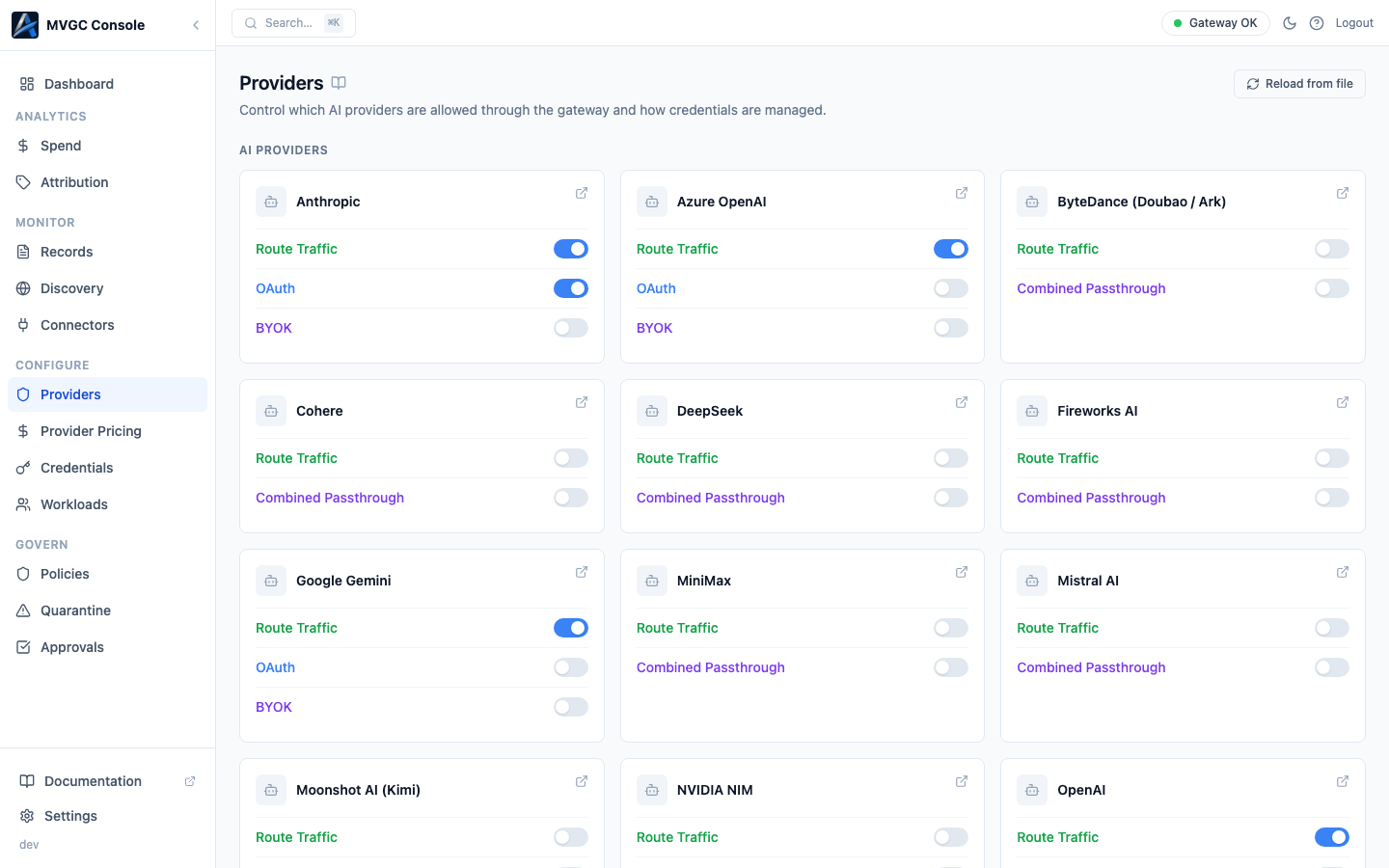
AI Providers
The top section shows a card grid of built-in provider integrations. Built-in providers include Anthropic, OpenAI, Google Gemini, Azure OpenAI, Cohere, DeepSeek, Mistral AI, xAI (Grok), Qwen, Moonshot AI, MiniMax, ByteDance, Perplexity, StepFun, Zhipu AI, NVIDIA NIM, Upstage, Together AI, Fireworks AI, and OpenRouter.
Each card shows the provider logo, name, and a set of toggles:
| Toggle | What it controls |
|---|---|
| Route Traffic | Whether the gateway routes requests to this provider. Disable to block all traffic to that provider regardless of credentials. |
| OAuth | OAuth-based credential mode. Takes priority over the org's stored credential when the client sends an OAuth token. |
| BYOK | Bring-your-own-key credential mode. Takes priority over the org's stored credential when the client sends their own API key. |
| Combined Passthrough | Shown instead of separate OAuth/BYOK toggles for providers where the gateway can't tell an OAuth token from a BYOK API key by header alone (currently Anthropic, OpenAI). Enabling it forwards any non-empty Authorization: Bearer value the client sends, including SDK placeholder keys, ahead of the org's stored credential. |
Not every provider supports every credential mode; only the modes available for that provider appear on the card. Providers with a distinguishable BYOK header (e.g. Gemini's x-goog-api-key, Azure's api-key) get independent OAuth and BYOK toggles; providers where the two are indistinguishable get the single Combined Passthrough toggle instead. See Combined Passthrough for the placeholder-key pitfall to watch for. Each toggle applies immediately with no restart.
Providers tagged as China-based show a China badge. Providers in beta or preview show a status badge.
Custom Providers
Below the built-in provider grid, the Custom Providers section shows any custom provider connectors you have defined in your gateway configuration files. Each custom connector has:
| Column | Description |
|---|---|
| Connector ID | The identifier used in policy rules and credentials |
| Display Name | Human-readable name |
| Compat Type | The API compatibility profile (e.g., openai for OpenAI-compatible APIs) |
| Base URL | The target URL the gateway routes requests to |
| Auth Mode | How the gateway authenticates with this provider |
| Source | Link to the config file where this connector is defined |
Custom providers are configured in YAML. Add a custom_connectors block to your policy bundle or gateway config file:
custom_connectors:
  - connector_id: my-internal-llm
    display_name: "Internal LLM"
    compat_type: openai
    base_url: https://llm.internal.example.com/v1
    auth_mode: bearer
After editing the file, click Reload from file (top right) to load the changes without restarting the gateway.
Traffic Rules
If any non-provider traffic rules are configured as toggleable add-ons, they appear in a Traffic Rules section below Custom Providers. Each rule shows its name, description, and an on/off toggle.
CP-connected mode
In CP-connected mode, all toggles are disabled and a read-only overlay appears. Provider and traffic rule configuration for CP-connected gateways is managed in the Axemere Cloud Console.